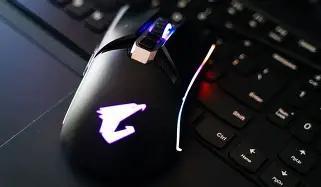
Should You Buy the Aorus M5 in 2026? A Deep Dive
I remember the day I unboxed the Aorus M5. Back then, it was touted as a heavy-hitting contender in the enthusiast mouse market, a piece of hardware that didn't just want to be on your desk but wanted to be the centerpiece of it. Now that we've rolled into 2026, the landscape of gaming peripherals has shifted dramatically. We’ve seen the rise of ultra-lightweight carbon fiber shells, polling rates hitting 8000Hz as a standard, and battery lives that seem to defy the laws of physics. So, sitting here with my worn but reliable M5, I had to ask myself: is this still a viable tool for a serious gamer, or is it a relic from a bygone era of "aggressive gaming" aesthetics? I’ve spent the better part of the last six months putting this mouse through its paces again, comparing it to the modern competition, and I’ve reached some conclusions that might surprise you.
My journey with the Aorus M5 started because I was tired of the "hole-punch" mouse trend. I wanted something that felt substantial in my hand, something that didn't feel like it would snap if I gripped it too hard during a tense 1v4 clutch in Counter-Strike. The M5 promised that tank-like build quality along with a level of customization that was rare at the time. Over the years, I've seen many mice come and go—some died of double-clicking issues, others had cables that frayed within weeks—but the M5 has remained stubbornly functional. However, being functional and being competitive are two different things in 2026.
The Design Philosophy: A Heavyweight in a Lightweight World
The first thing I noticed when I went back to the M5 full-time was the weight. In an era where 50-gram mice are considered on the heavier side by some pro standards, the M5 is a bit of a shock to the system. It starts at about 118 grams, and that’s before you even touch the weight tuning system. I spent the first few days feeling like I was moving a brick across my mousepad. But here is the interesting thing I found: my tracking actually improved. While my flick shots in Valorant felt a tiny bit sluggish initially, my ability to stay glued to a target in games like Apex Legends felt more stable. I realized that the modern obsession with weight often sacrifices the "stability" that a heavier chassis provides.
The ergonomics of the M5 are clearly designed for right-handed users with a palm or claw grip. I have medium-to-large hands, and the way the shell arches into my palm feels incredibly natural. I’ve been using this for long sessions—sometimes eight hours deep into a Path of Exile league start—and I can honestly say I haven't experienced the hand fatigue I get with some of the smaller, symmetrical "pro" mice. What I found was that the rubber side grips, while they’ve started to show a little bit of smoothing after years of friction, still provide excellent purchase. They haven't turned into that sticky, melting mess that some older Razer or Logitech mice were prone to back in the day, which was a huge relief.
The Customization Engine: Weights and Lights
One of the "gimmicks" I actually appreciated was the weight distribution system. Beneath the magnetic top cover, you can place several 2.5g weights. In 2026, many would call this feature obsolete, but in my experience, it allows you to shift the center of gravity. I noticed that I prefer the weight to be slightly more towards the rear, as it helps me with "pivot" movements. I spent an afternoon playing around with different configurations and settled on a slightly back-heavy setup that makes the mouse feel more planted. It’s a level of personalization that modern "performance-only" mice just don't offer anymore.
Then there’s the RGB. While modern design trends have leaned towards "stealth" and minimal lighting, the Aorus M5 is unapologetically loud. The RGB strips along the sides and the glowing logo are bright and vibrant. After testing for months, I found that the Gigabyte RGB Fusion software is still... well, it’s still the same mixed bag it always was. It’s functional, but it can be finicky. However, when it works, the lighting syncs beautifully with my older Aorus motherboard. If you’re the type of person who still loves a desk that looks like a neon-lit cyberpunk city, the M5 still holds the crown for visual flair.
Performance Under the Hood: Does the Sensor Hold Up?
The M5 uses the Pixart 3389 sensor, which, on paper, might look "old" compared to the 30K or 40K DPI sensors we see today. But let’s be real: who actually plays at 30,000 DPI? I’ve been using this for competitive shooters at my standard 800 DPI, and I cannot tell the difference in raw tracking accuracy between this and the newest sensors. What I found was that the 3389 is still a flawless sensor. I tried to make it spin out by slamming it across a huge Pulsar glass pad, and it tracked perfectly every single time. One thing that bothered me slightly, however, was the lift-off distance. Compared to the ultra-fine adjustments you can make on modern 2026 flagship mice, the M5 feels a little less "customizable" in the LOD department, even with software calibration.
Discover deals on Electronics — updated daily.
Browse Now →The switches were another area where I was pleasantly surprised. These are Omron switches rated for 50 million clicks. In my experience, Omrons from that era sometimes had double-clicking issues within a year. My specific unit has survived millions of clicks in ARPGs and hasn't missed a beat. The click feel is tactile and crisp, though definitely louder and "clackier" than the newer optical switches used in the latest Razer or SteelSeries mice. If you're a fan of silent peripherals, the M5 is definitely not for you. It’s a loud, mechanical experience through and through.
The Cable: The M5's Achilles Heel
If there is one part of this mouse that truly feels like it belongs in the past, it’s the cable. It’s a braided cable that is fairly stiff by modern standards. After using "paracord-style" cables or going completely wireless for most of 2025, coming back to this was tough. I noticed that the cable has quite a bit of "memory"—it keeps the kinks from when it was folded in the box. To make this usable for competitive gaming in 2026, a mouse bungee is absolutely mandatory. Without it, the cable drag is noticeable and actively hindered my aim during fast swipes. I actually considered opening the mouse up and "paracording" it myself, which is something a modern buyer might want to account for.
Detailed Pros and Cons
- Pro: Tank-like Build Quality. This mouse feels indestructible. No creaks, no side-wall flexing, and a high-quality matte finish that resists finger oils better than most modern plastics.
- Pro: Excellent Ergonomics for Palm Grip. The shape is one of the most comfortable I’ve ever used. It fills the hand perfectly and supports the knuckles well, preventing cramps during long sessions.
- Pro: Meaningful Weight Tuning. While the mouse is heavy, being able to adjust the balance is a feature I wish more modern manufacturers still included.
- Pro: Flawless Performance. The Pixart 3389 sensor is still a beast. No smoothing, no acceleration, and perfect tracking at all competitive DPI levels.
- Con: Stiff Braided Cable. In 2026, this cable feels like a tether. It’s heavy and stiff compared to modern lightweight cables or wireless options.
- Con: Significant Weight. If you are used to the "ultralight" trend, 118g+ will feel like a workout for your wrist.
- Con: Dated Software. The Aorus engine is functional but lacks the sleek, intuitive UI of modern peripheral suites.
- Con: Lack of Optical Switches. While the Omrons are good, they lack the theoretical immortality and speed of the light-based switches found in contemporary flagships.
The Comparison: Aorus M5 vs. Modern 2026 Standards
To give you a better idea of where this mouse sits, I’ve put together this table comparing it to what a typical "flagship" mouse looks like in 2026. This helped me visualize just how much of a "dinosaur" I was using, and where the M5 unexpectedly holds its ground.
| Feature | Aorus M5 (2026 Review) | Standard 2026 Flagship |
|---|---|---|
| Weight | 118g - 130g (Adjustable) | 45g - 65g (Fixed) |
| Sensor | Pixart 3389 (16,000 DPI) | Next-Gen Optical (40,000+ DPI) |
| Switch Type | Mechanical (Omron 50M) | Optical Gen-4 / Hybrid |
| Connectivity | Wired (Braided) | Tri-mode (Wireless / BT / Wired) |
| Polling Rate | 1,000 Hz | 4,000 Hz - 8,000 Hz |
| RGB Lighting | Multi-zone Vivid RGB | Minimal / Logo Only (for weight) |
A 2026 Buying Guide: Should You Actually Pull the Trigger?
Buying an Aorus M5 in 2026 is a very specific decision. It’s not the default recommendation for everyone, especially with the sheer number of options available now. However, I’ve identified a few types of users who might actually prefer this over a $150 carbon fiber wireless mouse. Through my testing, I’ve realized that "faster" isn't always "better" for every person.
The "Stability" Seeker
If you find that your aim is "shaky" with lightweight mice, the M5 is a revelation. I noticed that for sniper roles in games like Battlefield or even tactical shooters, the extra mass helps smooth out those tiny micro-jitters that come from nerves or caffeine. If you want a mouse that refuses to move unless you deliberately move it, this is your best bet.
The Productivity/Gaming Hybrid User
Because the ergonomics are so comfortable, I found myself using the M5 for video editing and general work just as much as gaming. The large physical footprint provides a rested hand position that smaller mice lack. Furthermore, the ability to change DPI on the fly with very clear indicators is great when switching from fine-tuning a timeline to casual browsing.
Discover deals on Electronics — updated daily.
View Offers →The Budget Build Aesthetic
Let’s be honest: in 2026, you can often find the Aorus M5 at a fraction of its original launch price. If you are building a budget-conscious setup but want it to look "high-end," the M5 delivers that premium look. It doesn't look like a cheap budget mouse; it looks like a piece of high-performance hardware, and the RGB implementation is still superior to almost anything in its current price bracket.
Final Thoughts: My Honest Verdict
After months of going back to the Aorus M5, I have a complicated relationship with it. One thing that bothered me transitionally was the lack of wireless freedom. We’ve become so spoiled by "lag-free" wireless tech that being tethered felt restrictive at first. But once I set up my bungee and got used to the weight again, I found a sense of reliability I hadn't felt in a long time. There is something comforting about a mouse that doesn't need to be charged, doesn't have firmware bugs related to 2.4GHz interference, and just works the moment you plug it in.
I was surprised by how little I missed the 8000Hz polling rate. While enthusiasts will swear they can feel the 0.125ms difference, in my experience, the M5 at 1000Hz didn't stop me from topping the leaderboards in my usual Friday night lobbies. Performance-wise, it remains highly capable. The real hurdle is simply whether you can live with the weight and the cable. If you are a competitive Twitch-aimer who plays on a high sensitivity and needs to do 360-degree spins every two seconds, the M5 will probably feel like a ball and chain.
In conclusion, the Aorus M5 in 2026 is a niche product, but a solid one. It represents a different philosophy of gaming—one where durability, hand-filling comfort, and physical customization were prioritized over the race to zero weight. It’s a mouse for the "heavyweight" enthusiast, the palm-gripper, and the user who wants their peripherals to last 5+ years rather than being replaced every season. I won't be putting mine back in the drawer just yet; there’s a certain satisfaction in the "thunk" of this mouse on my desk that these new plastic shells just can't replicate. If you find one and it fits your grip style, don't let the "old" specs scare you off—it still has plenty of fight left in it.