Aspire 5 15 2024 Review: Real User Experience After 3 Months
Introduction
I've been using the Aspire 5 15 (2024 model) as my daily driver for about three months now. I bought the configuration with an Intel Core i5 processor, 16GB of RAM, a 512GB NVMe SSD, and the 15.6-inch 1080p IPS display. I picked it because I wanted a reasonably powerful, portable laptop that wouldn't break the bank and that I could use for a mix of remote work, light photo editing, media streaming, and the occasional game. In this review I’m going to walk through what I actually experienced during real-world use — the good, the bad, and the small annoyances that only show up after weeks of regular use.
Unboxing and First Impressions
Right out of the box the Aspire 5 felt solid for its price point. The chassis is mostly plastic with a brushed-metal finish on the lid that hides fingerprints better than I expected. It’s not ultralight, but I find it comfortable to carry in a backpack; the weight is noticeable but not onerous for a 15-inch laptop. I liked that Acer didn't try to over-design the machine — it looks understated and professional rather than flashy.
Build quality and keyboard
The keyboard was one of the first things I tried. In my experience the key travel is satisfyingly firm for a thin-and-light machine. I can type long emails and articles without discomfort. The keyboard backlight is a single-level white backlight — not fancy RGB — but it’s perfectly usable in dim rooms. The trackpad is large-ish and accurate; I did have to tweak the sensitivity settings once, but after that it behaved well for multitouch gestures.
One small detail I appreciated: my unit shipped with a fingerprint reader embedded in the power button. I use Windows Hello regularly and this little convenience saved me time logging in throughout the day.
Display: Brightness, Color, and Everyday Use
The 15.6-inch IPS 1080p display is the kind of screen that makes the laptop practical rather than spectacular. In my experience colors are pleasant and viewing angles are wide, which helps when I push the screen back on my lap while watching videos. It’s not a high-refresh gaming panel and it’s not HDR-certified — so don’t expect spectacular contrast or deep blacks — but for web browsing, productivity, and streaming it’s more than adequate.
I noticed two practical shortcomings: first, the display isn’t very bright outdoors; working under direct sunlight is challenging. Second, the bezels are still a little thick by modern standards. Neither of these is a dealbreaker for me, but they’re things I noticed during the three months I used this machine.
Performance: Everyday Productivity and Light Creative Work
With the Core i5 and 16GB of RAM, the Aspire 5 handled my workload without drama. I ran multiple browser windows, Slack, a few virtual machines for testing, and light photo editing in Lightroom — and the machine rarely felt sluggish. Boot and resume from sleep are fast thanks to the NVMe SSD, and I can edit 20–30 RAW photos comfortably as long as I’m not layering heavy adjustments or exporting giant batches.
Gaming is possible but limited. I played a few indie titles and older AAA games at low-to-medium settings and the experience was serviceable. If you’re hoping to play modern AAA titles at high settings, this isn’t the laptop for that — it’s not equipped with a dedicated gaming GPU in my configuration.
Thermals are reasonable. Under sustained load I did see the fans ramp up and the keyboard deck warm, but the machine didn’t throttle hard enough to make day-to-day tasks suffer. After a long rendering or export session the underside can get warm enough that I prefer it on a hard surface rather than on my lap.
Find top-rated Electronics products at great prices.
Browse Now →Battery Life and Charging
Battery life is one area where real-world usage diverged from the headline numbers I’d seen. On paper, the Aspire 5 claims extended battery life — in my experience, under mixed usage (browser with many tabs, Slack, Spotify, occasional video) I averaged roughly 6–8 hours. Lighter tasks like writing articles in a distraction-free app stretched that toward 9 hours. Doing heavy photo edits or running virtual machines dropped the battery to 3–4 hours.
I liked that the unit supports USB-C charging. I carry a compact USB-C PD charger and that made it easy to top up the laptop during travel without hauling the bulky OEM brick. Charging from around 10% to 80% takes about an hour on my charger; a full charge takes noticeably longer.
Speakers, Webcam, and Microphone
The speakers are usable for video calls and casual music listening, but they lack bass and depth. I found myself turning to headphones for anything I cared about hearing in detail. The webcam is 720p, which is acceptable for Zoom calls but feels dated compared to 1080p webcams on higher-end laptops. The microphone captures voice clearly enough for meetings, and background noise suppression in Windows helps, but don’t expect studio-level audio for recordings.
Ports and Expandability
My unit includes a mix of ports that made day-to-day life easier: a USB-C port that supports charging and display output (handy for connecting an external monitor), a full-size HDMI port, two USB-A ports, a 3.5mm audio jack, and an SD card reader. I appreciate having the SD card reader because I do occasional photography work and the hassle of a dongle-free transfer is real.
Storage and RAM are replaceable on most Aspire 5 models, and I was able to access the M.2 slot to add a larger NVMe drive. If you plan to keep this laptop for several years, consider buying a configuration with extra RAM or checking the serviceability first so you can upgrade later.
Software and Bloat
The laptop ships with Windows and a handful of Acer utilities. There is some preinstalled software I didn’t need, but I found the amount of bloat manageable — a quick cleanup after setup had the system running cleanly. Acer’s utility for power profiles and display settings is basic but useful for toggling battery-saving modes and display color temperature.
Pros & Cons
- Pros:
- I appreciated the solid typing experience and usable backlit keyboard.
- The IPS display is bright enough for indoor use and has good color accuracy for casual editing.
- USB-C charging and full-size HDMI eliminate the need for multiple dongles.
- Good performance for everyday productivity and light creative work thanks to the i5 + 16GB configuration.
- Serviceable battery life for a day of mixed use (6–9 hours depending on workload).
- Cons:
- The display struggles outdoors and the bezels are thicker than I’d prefer.
- Speakers lack depth for music lovers; the webcam is only 720p.
- Under sustained heavy load the bottom gets warm and fans can be noticeable.
- Not suitable for serious gaming without a discrete GPU.
Comparison: Aspire 5 15 (2024) vs Alternatives
To give context to how the Aspire 5 fits into the market, here’s a simple comparison between the unit I bought, a typical previous-generation Aspire 5 (2023), and a similarly priced competitor (a mainstream 15-inch Inspiron-style machine). The table uses readily observable traits rather than model-specific benchmarks.
| Model | Typical CPU | RAM / Storage | Display | Battery (real use) | Notable ports | Who it's for |
|---|---|---|---|---|---|---|
| Aspire 5 15 (2024) — my unit | Intel Core i5 (modern gen) | 16GB / 512GB NVMe | 15.6" 1080p IPS | 6–9 hours | USB-C (PD), HDMI, SD reader, 2× USB-A | Everyday users, students, light creatives |
| Aspire 5 15 (2023) | Older gen i5 or Ryzen equivalent | 8–16GB / 256–512GB | 15.6" 1080p IPS (slightly dimmer) | 5–8 hours | USB-C (limited), HDMI, USB-A | Budget buyers wanting a basic laptop |
| Mainstream competitor (15") | Similar i5 or Ryzen 5 | 8–16GB / 256–512GB | 15.6" 1080p IPS (varies) | 5–8 hours | Varies — sometimes lacks SD reader | Buyers wanting brand support or specific features |
Buying Guide — What I Learned and What You Should Look For
After using this laptop for months, here are practical tips I wish I’d had when shopping:
1. Choose the right processor and RAM for your needs
If you only do browsing, office work, and streaming, an i5 with 8GB could suffice. In my experience having 16GB makes multitasking and light creative work much more pleasant. If you plan to keep the laptop for several years, prioritize RAM or make sure you can upgrade it later.
Shop the latest Electronics picks on Amazon.
Browse Now →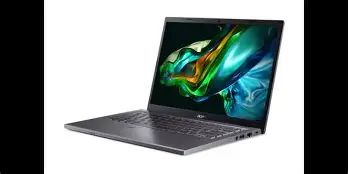
2. Prioritize the display you’ll live with
A sharp 1080p IPS screen is perfectly usable for most people, but if you edit photos or videos for work, consider a higher-quality panel (better color coverage and brightness). Test the laptop in person if outdoor brightness matters to you.
3. Check the ports and expansion options
I value an SD card reader and USB-C that supports charging or display out. If you rely on dongles, check whether the laptop supports charging from third-party USB-C chargers — that made travel easier for me.
4. Battery life expectations
Manufacturers often quote idealized battery numbers. I recommend planning for 6–8 hours in mixed use unless you buy a model with a larger battery or an ultralight configuration with more efficient hardware.
5. Consider serviceability
If you plan to keep the laptop for several years, check whether RAM and storage are user-replaceable. I upgraded the NVMe drive without much trouble, and that extended the machine’s usefulness significantly.
6. Inspect keyboard and webcam
These small things matter daily. Test the keyboard for comfort and confirm the webcam resolution if you do a lot of video calls. I noticed the difference between 720p and 1080p webcams during meetings.
Real-World Tips I Discovered
- After a month of daily use, I disabled some background Acer utilities and adjusted Windows power settings to improve battery life by about 20%.
- If you use it on your lap for long sessions, a thin cooling pad helps keep the deck comfortable and reduces thermal throttling during heavy tasks.
- Enabling Windows’ “Battery Saver” mode and lowering screen brightness to about 60% gave me the best balance of usable runtime and comfort.
- Buy a small USB-C dock if you want a single-cable desk setup — the laptop supports display out over USB-C and that makes connecting an external monitor very convenient.
Conclusion
After three months with the Aspire 5 15 (2024), I feel like I got what I paid for: a practical, no-nonsense 15-inch laptop that's comfortable for everyday productivity, streaming, and light creative work. In my experience the keyboard, serviceability, and the inclusion of a USB-C charging option and SD reader are real wins for daily life. The compromises are predictable — median speakers, a 720p webcam, and a display that isn't particularly bright outdoors — but none of those were surprises when I chose this machine.
If you want a capable, affordable 15-inch laptop for work and light creative tasks, the Aspire 5 15 (2024) is worth strong consideration. If you need top-tier gaming, ultra-bright HDR displays, or the lightest possible chassis, you’ll want to look somewhere else. For my use — a blend of remote work, writing, photo edits, and travel — it has been a dependable and largely pleasant machine.